Explainer Foundry Free sample

How it works

How Explainer Foundry makes your explainer.

Six steps, all online. You bring what you know and approve each step. The tool does the making, and nothing moves on until you approve it.

The free 5-second sample is open now. Full films come with early access, which isn't open yet.

The finished film page in the working build, with the film ready to download
Screens from the working build. Details may change before launch.

Six steps. You approve every one.

Every film takes the same path. Each step ends with your approval, so nothing is made on work you haven't seen. Here, "we" means the tool: the making is done with AI, in a process built by animators.

Every screen below is from the working build, showing our test film in the latest version of the app.

Before step 1

Your brief

You do
Name your film and pick its shape and length. Then answer a few questions: the business, who's watching, where it will be shown, the tone and what viewers should do next.
We do
Turn your answers into the starting point for your script.

Your brief stays open to changes until you approve the script.

The brief: who the business is, who's watching, where it will be shown, the tone and what needs explaining
The brief, with questions about the business, who's watching, and where and how the film will be shown.
  1. Step 1 of 6

    Script

    You do
    Ask the assistant for a draft. Edit what's said and what's seen scene by scene, have one scene rewritten, or give a direction for the whole script, like "make it warmer".
    We do
    Draft your script as scenes: what's said on one side, the words on screen and what's seen on the other. A live timer shows if it fits your length.

    You approve the script. It's locked before anything is drawn.

    The script step: the live film length timer, and scene 1 with what's said beside what's seen
    The live timer, and what's said beside what's seen for each scene.
  2. Step 2 of 6

    Brand and look

    You do
    Add your logo and up to 5 brand colours if you like. Then pick one of 27 looks for the whole film, from example frames.
    We do
    Check that every colour used for words or key graphics is easy to read, and suggest the nearest colour that passes. Your colours go into your frames and end card.

    You approve your look before any frames are made.

    Logos can be PNG, JPG, SVG or PDF. Looks not yet tested in motion are labelled in the app.

    Your brand: a logo, two brand colours and a contrast check on each one, with a suggested colour that passes Pick the look for your whole film: 27 looks, with Flat illustration chosen
    The brand kit with its contrast checks, and the looks to choose from.
  3. Step 3 of 6

    Storyboard

    You do
    Check one frame per scene. Mark each one Looks good or Change this with a note, edit a scene's words, or give one direction for every frame, like "warmer evening light".
    We do
    Draw every frame from one cast and style sheet to help keep characters consistent, then redraw only what you mark. Changes are read back to you before anything is made.

    You approve the storyboard. These frames are what gets animated.

    Each send uses one storyboard round, and so does a direction for every frame. The page counts the rounds you've used.

    Storyboard frames, each with Looks good or Change this, and a change note on scene 3 Global direction and style: one change for every frame, with the storyboard rounds used
    Frames marked Looks good or Change this, and one direction for every frame.
  4. Step 4 of 6

    Voice and music

    You do
    Choose one of 5 female or 3 male voices, hear a sample, then listen to every line.
    We do
    Record each line of your script on its own, so the timing is exact.

    You approve the voice.

    Music will be chosen here too. It isn't switched on in the working build yet, so the test film has voice only.

    The voice step: five female and three male voices, each with a short sample, and Warm chosen
    Five female and three male voices, each with a short sample.
  5. Step 5 of 6

    Timing preview

    You do
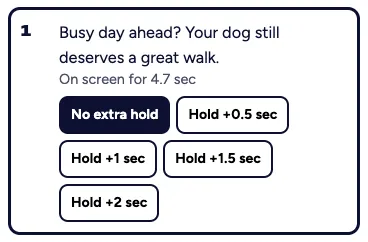
    Watch your frames timed to your voice. Add a hold to any scene that needs a beat longer.
    We do
    Put your frames, voice and on-screen words together as a preview, before anything is animated.

    You approve the timing before animation starts.

    The timing preview: your frames, timed to your voice, with Make the preview again and Approve timing Scene 1 on screen for 4.7 seconds, with holds from half a second to 2 seconds
    The timing preview, and the holds for one scene.
  6. Step 6 of 6

    Film

    You do
    Review your film scene by scene and mark any scene to change. Add an end card in your brand colours if you like, then approve and download.
    We do
    Animate each scene from its approved frame, add your voice and on-screen words, and animate again only the scenes you mark.

    You approve the finished film, then download the clean copy.

    Each send uses one animation round. Your review copy only plays in the app, and the clean download comes when you finish.

    Review your film: the marked review copy, with the animation rounds used An end card in the brand colours, with the logo and Book your first walk today
    The marked review copy, and an optional end card in your brand colours.

Made in the tool

Our test film, start to finish.

About 19 seconds, made in the working build from brief to final film. Not a customer film.

  • Flat illustration look
  • Warm voice, every line recorded on its own
  • One round of storyboard changes
  • One round of animation changes
  • Voice only, as music isn't switched on yet
  • Made before the brand kit and end card were added
A 19-second test film made start to finish in the tool. Sound on.

The free sample, and what a full film adds.

The free sample shows one short scene of your idea, animated. A full film takes your whole message through all six steps.

Free, open now

Your free sample includes

  • One short scene: what's said, up to 12 words, and what's seen
  • Horizontal or vertical
  • 1 of 3 voices
  • Your scene in up to 3 styles
  • One change to your frame
  • About 5 seconds in HD, with our web address on it
Start my free sample

On a plan, from early access

A full film adds

  • Your whole script, written with the assistant and timed as you go
  • Your logo and brand colours, with contrast checks
  • A frame-by-frame storyboard
  • Complete voiceover from 8 voices, and music
  • A timing preview before animation
  • Rounds of changes on your storyboard and animation
  • An optional end card in your brand colours
  • A full-resolution download

Music isn't in the working build yet.

What your plan means

What your plan means.

Planned monthly plans, in plain words. Reserve early access and get 30% off for your first 12 months.

A minute of animation

A minute of finished film. Split your minutes across as many films as you like.

For example, Medium's 2 minutes a month could be one 2-minute film, two 1-minute films or four 30-second films.

Storyboard rounds

A round is one set of frame changes you send. Mark the frames to change, add a note to each and send them together. Only those frames are redrawn.

Animation rounds

The same idea for movement. Mark the scenes to change, describe what should move differently, and only those scenes are animated again.

Rollover

Unused minutes roll over for 3 months, so a quiet month isn't wasted.

Founding rate

Reserve early access and get 30% off for your first 12 months. Nothing to pay today, no card needed and no commitment.

Cancel any time

Cancel any time and keep your films.

The plans side by side

Planned prices in US dollars, a month, plus local taxes.

PlanSmallMediumLarge Our pick
Founding rate, first 12 monthsUS$230US$405US$906
At launchUS$329US$579US$1,295
Animation a month1 minute2 minutesUp to 3 minutes
Rounds of changes5 storyboard rounds, 3 animation rounds5 storyboard rounds, 3 animation roundsUnlimited revisions, fair use applies

On every plan: split your minutes across as many films as you like, unused minutes roll over for 3 months, and you can cancel any time and keep your films. Nothing to pay today.

Reserve the founding rate

Good questions

Something else on your mind? Email [email protected].

How long does it take?

It depends on how long your film is and how many changes you make, and we haven't timed enough films to promise a turnaround yet. As one test, the tool spent about 3 minutes making our test film across all six steps, plus the time spent reviewing. Longer films take longer, and animation is the slowest step.

What if I don't like a frame?

Mark it Change this and say what you'd like instead, or give one direction for every frame. Only what you mark is redrawn, and your changes are read back before anything is made. Small and Medium include 5 storyboard rounds. Large has unlimited revisions, fair use applies.

Can I use my brand colours and logo?

Yes. In the working build you can upload your logo (PNG, JPG, SVG or PDF) and add up to 5 brand colours. Your colours go into your frames and end card, and the app checks that words stay easy to read, suggesting the nearest colour that passes. Uploading product screenshots is still to come.

Is it made with AI?

Yes. It's AI-assisted animation, run through a production process built by animators, and you direct it at every step. On Small, Medium and Large, no person reviews each film.

When can I make a full film?

Full films come with early access, which isn't open yet. Reserve early access and we'll email you when it opens. The free 5-second sample is open now.

See your idea in motion.

Start with a free 5-second sample. Reserve early access for full films.